
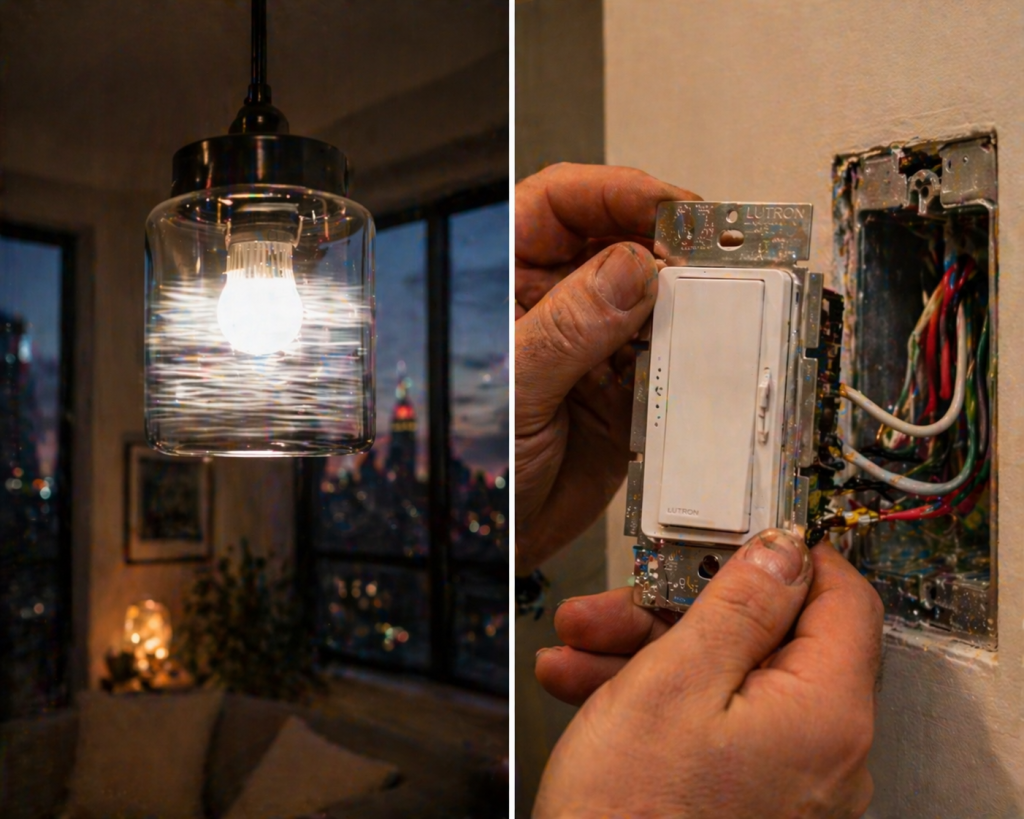
You swapped your old incandescent bulbs for LEDs to save on the ConEd bill. The new bulbs cost more, they look sharper, and everything works beautifully until you turn the dimmer down. Then they flicker. Or buzz. Or cut out entirely at low brightness. Or the bulbs stay dim when you push the slider up and suddenly jump to full brightness like a nightclub strobe.
This is the single most common post-LED-retrofit complaint in NYC homes, and it is almost never the bulbs’ fault. It is the dimmer specifically, a dimmer built for incandescent loads trying to control a completely different type of electrical device. Here is what is actually happening, how to fix it, and the four things most homeowners get wrong when they try to solve it themselves.
Why LEDs and Old Dimmers Disagree
A traditional incandescent bulb is a simple electrical load. The dimmer chops the AC waveform, the bulb gets less power, the filament gets cooler, the light gets dimmer. Clean, predictable, boring.
An LED bulb is not a simple load. It contains a tiny driver circuit an electronic power supply that converts the AC from your wall into the DC that the LED chip actually runs on. When an old dimmer chops that AC waveform, the driver circuit inside the LED has to interpret the chopped signal and produce a matching dim output. If the dimmer and the driver are not designed to communicate, the result is the symptoms you are seeing.
Three Symptoms, Three Different Root Causes
- Flicker at low brightness the dimmer is pushing voltage below the LED driver’s minimum operating threshold. The driver is trying to maintain output, failing, and restarting in a loop.
- Buzzing or humming the chopped waveform is inducing mechanical vibration in the dimmer itself, the bulb driver, or both. Leading-edge (TRIAC) dimmers are the most common culprit with electronic LEDs.
- Pop-on / drop-out behavior the LED stays dark until you push the slider past a certain point, then jumps to a middle brightness and refuses to go lower. The minimum-load threshold of the dimmer is not being met.
Each of these has a different fix. Diagnosing the symptom before you start swapping things is the single biggest time-saver on this type of problem.
The Four Dimmer Types You Need to Know
Dimmer technology splits along two axes: the waveform they chop (leading-edge vs trailing-edge) and the load they are designed for (incandescent, MLV, ELV, CFL/LED). Match the wrong one to your bulbs and the lights misbehave.
| Dimmer Type | Best For | Works with LEDs? |
| Standard Incandescent (TRIAC) | Incandescent, halogen | Only dimmable LEDs rated for TRIAC, often poorly |
| MLV (Magnetic Low Voltage) | Low-voltage halogens with magnetic transformer | No wrong waveform for LED drivers |
| ELV (Electronic Low Voltage) | Low-voltage halogens with electronic transformer | Sometimes, with dimmable LEDs rated for ELV |
| CL / CFL-LED (Trailing-Edge) | Dimmable LEDs and CFLs | Yes this is the right choice for most LED installs |
| 0-10V Dimmer | Commercial LED fixtures with dedicated control wire | Yes, but requires separate low-voltage wire |
| Smart Dimmer (Lutron Caseta, etc.) | Dimmable LEDs, mixed loads | Yes best-in-class compatibility |
If your current dimmer was installed before 2015, it is almost certainly a standard TRIAC (leading-edge) unit designed for incandescent loads. Swapping it for a CL-rated trailing-edge dimmer is the single highest-hit-rate fix for LED flicker and buzz. Our LED retrofit lighting upgrade guide covers the broader picture of getting a house-wide LED conversion right the first time.
The ‘Dimmable’ Label on LED Bulbs Is Not a Guarantee
Here is the trap that catches most homeowners: the LED bulb box says ‘dimmable,’ the dimmer on the wall has always worked, so everything should be fine. It isn’t. ‘Dimmable’ on an LED package tells you the driver is capable of dimming. It does not tell you which dimmer type it was engineered to work with.
Quality LED manufacturers publish a dimmer compatibility list a PDF or web page showing every dimmer model the bulb has been tested with, and how well each one performs. Lutron, Cree, Philips, and Feit all publish these. Generic or budget LED brands usually do not, which is why the five-bulb pack from the hardware store often flickers even on a new dimmer.
What to Look For on the Bulb Package
- ‘Dimmable’ bare minimum, does not tell you much.
- ‘Compatible with trailing-edge dimmers’ specific, useful.
- ‘CL dimmer compatible’ works with Lutron CL-series and equivalent.
- A listed compatibility URL gold standard. Manufacturers who publish tested dimmer lists are the ones whose bulbs actually perform.
Minimum Load: The Problem Nobody Talks About
Old dimmers were designed for incandescent bulbs that pulled 40W, 60W, 75W each. A three-bulb fixture pulled 180W. The dimmer had plenty of load to work with.
Replace those with modern LEDs and that same fixture now pulls maybe 24W total. Most standard dimmers have a minimum load of 25W or higher. You are right at or below the threshold, which is exactly the condition that produces the classic ‘light won’t turn on at low brightness, then pops on brightly’ behavior.
How to Fix a Minimum-Load Problem
- Use a dimmer with a lower minimum load CL-rated dimmers typically work down to 1W.
- Add a compatible phantom load (a resistor accessory some manufacturers sell for exactly this purpose).
- Add another LED fixture on the same circuit to push total load above the threshold not always practical, but effective.
- Increase the LED wattage if the fixture can handle it, e.g., use 9W bulbs instead of 6W in a 4-bulb fixture.
For recessed can conversions specifically where minimum load issues are most common because of how few watts modern LED cans draw our recessed lighting installation guide covers the driver and dimmer selection that avoids this problem from the start.
Neutral Wire: The Silent Compatibility Issue
This one bites a lot of NYC homeowners who are upgrading to smart dimmers. Older NYC homes especially pre-war apartments and brownstones often have switch boxes without a neutral wire. The original wiring ran power from the panel to the light fixture first, then down to the switch as a ‘switch loop.’ Only two wires at the switch box: a hot and a return.
Classic mechanical dimmers don’t need a neutral. Most modern smart dimmers do. Install a Lutron Caseta or a WiFi smart dimmer in a box with no neutral, and it either will not power on, or it will power on briefly and then drop offline repeatedly. The smart dimmer’s internal electronics need a path for the small steady current the module draws to stay alive.
The full breakdown of what this means, how to identify your situation, and what the no-neutral workarounds look like is in our dedicated 2-wire vs 3-wire smart switch guide. Short version: Lutron Caseta works without a neutral, most other brands don’t. Confirm before you buy.
Three-Way and Four-Way Dimmers: Extra Rules
Dimming a light controlled by two or three switches (hallways, stairwells, long rooms) adds another layer. You cannot mix dimmers with standard switches in a 3-way circuit either the main switch must be the only dimmer (and the others 3-way compatible non-dimmer slaves), or you need a dimmer-rated companion switch designed for the specific dimmer brand. Our 3-way switch wiring guide for NYC covers the wiring side; on the compatibility side, always buy dimmers as a matched kit for multi-location control.
When Flicker Isn’t the Dimmer’s Fault
Most LED flicker traces back to dimmer incompatibility. Some doesn’t. These are the cases where changing the dimmer will not help, and you need to look elsewhere:
- Loose connections in the switch box or fixture. A dimmer switch that gets warm to the touch, or a light fixture that flickers even when the dimmer is at max, is often a loose wire. Our guide on why a light switch gets warm covers the safety implications.
- Voltage drop on long runs. In large NYC apartments with panel-to-fixture runs over 60 feet, voltage drop at the fixture can fall below the LED driver’s operating window at low dim settings.
- Shared-neutral circuits. In some NYC wiring configurations (especially in multi-circuit boxes), a shared neutral between two circuits on opposite legs of the service can induce flicker when major appliances elsewhere in the home cycle.
- Failing LED driver. The driver inside the bulb itself is a small electronic component with a finite lifespan. Cheap LEDs sometimes start flickering after 6 18 months of use. Try a fresh bulb in the same fixture if the flicker disappears, the old bulb was the issue.
- Utility-side voltage fluctuation. Rare, but real. If multiple fixtures in the house flicker simultaneously during specific times of day, call Con Edison before you call an electrician.
What a Typical NYC Fix Looks Like
For a standard residential flicker-and-buzz complaint, a licensed electrician’s approach usually goes like this:
- Inspect the existing dimmer and switch box. Note brand, model, age, and whether a neutral is present.
- Check the LED bulbs or fixtures brand, wattage, dimmable rating, any published compatibility notes.
- Test the circuit voltage at the switch, voltage at the fixture, tightness of all connections.
- Diagnose the root cause dimmer type mismatch, minimum load issue, neutral absent, loose connection, failing bulb.
- Recommend a specific fix usually a dimmer replacement with a CL-rated or smart dimmer matched to the installed bulbs, sometimes a bulb swap to a manufacturer with verified compatibility.
- Install and test across the full dim range.
Most of these jobs wrap up in a single visit. The exception is homes where fixing one dimmer reveals that the entire house was wired without neutrals at switch boxes in which case the conversation shifts to scope and whether to address it comprehensively or one room at a time.
A Quick Word on Smart Dimmers
If you are already considering fixing the dimmer, it is worth looking at smart dimmers as the upgrade rather than replacing a mechanical dimmer with another mechanical dimmer. Lutron Caseta in particular has the best LED compatibility track record in the consumer market and, unlike most smart brands, works without a neutral. Our smart lighting installation guide covers the broader smart-home integration scenes, voice control, scheduling, and which ecosystems play nicely together.
Frequently Asked Questions
My LEDs flicker only at certain dim levels, but work fine full-on. Is that normal?
Not normal, but common. It means the dimmer is chopping the waveform in a way the LED driver cannot consistently interpret at that specific range. Replacing the dimmer with a CL-rated or trailing-edge model almost always fixes it.
Can I mix dimmable and non-dimmable LEDs on the same dimmer?
No. Even one non-dimmable bulb in a multi-bulb fixture on a dimmer can cause the whole circuit to flicker or misbehave. All bulbs on a dimmer must be dimmable, and ideally from the same manufacturer.
Why does my dimmer get hot with LED bulbs?
Often a sign of incompatibility the dimmer is dissipating heat as it tries to regulate an incompatible load. Hot dimmers are also a fire risk. Stop using the dimmer at high brightness settings and replace it promptly.
Is a smart dimmer worth it over a regular LED dimmer?
For flicker control alone, a good CL dimmer like a Lutron Diva is fine and much cheaper. A smart dimmer pays off if you want scheduling, app control, voice control, or integration with a broader smart home setup. On LED compatibility both are fine the mechanical CL dimmer is actually simpler.
My buzzing comes from the bulbs themselves, not the dimmer. What does that mean?
The LED driver is resonating with the chopped waveform. Same root cause as dimmer buzz — wrong dimmer technology. Switching to a trailing-edge or CL dimmer usually quiets both the switch and the bulbs.
Bottom Line
LED flicker and buzz is the residential electrical equivalent of a solved problem that keeps showing up because the path to the solution is mostly invisible on the bulb packaging. In 9 out of 10 cases, the fix is a $25 CL-rated dimmer and a matched dimmable LED bulb. In the remaining 1 case, it is a loose connection, a missing neutral, or a failing driver — none of which a homeowner should diagnose without some electrical safety training.
If you’ve already swapped bulbs once and the new ones flicker too, that is your signal to stop experimenting and look at the dimmer. If the dimmer is warm to the touch, the switch box smells even faintly like overheated plastic, or the flicker happens on multiple fixtures at once, stop using the circuit and call an electrician.
A&B Electric Wiring handles LED dimmer compatibility diagnosis and replacement across NYC. Get in touch for a same-week visit, or explore our full range of lighting installation services — or book an electrical safety inspection if the flicker is one of several signs something is off with your circuits.